

 Open Access||Research Article
Magic Learn-DrawInAir: Redefining Creativity, Problem Solving, Building Worlds with AI-Powered Gesture Learning
Department of Computer Engineering, Thakur College of Engineering and Technology, Mumbai, Maharashtra, 400101, India
Abstract
Magic Learn-DrawInAir is an AI-powered educational tool that enables users to draw, solve equations, control presentations, stream drawings via virtual camera, and interact through a real-time 3D avatar using only hand gestures and facial tracking, eliminating the need for physical input devices. The system integrates MediaPipe for real-time hand tracking, OpenCV for virtual canvas rendering, and Streamlit for a user-friendly web interface. A unique aspect is the use of Google Gemini API, which analyzes gesture-based drawings to solve mathematical expressions or describe creative visuals. The platform also supports gesture-based navigation of PowerPoint or PDF slides, making it highly suitable for virtual teaching and learning environments. The platform supports gesture-based navigation and annotation of PowerPoint or PDF slides, virtual camera output for drawing and erasing in OBS Studio, Google Meet, and Zoom, and a 3D avatar using MediaPipe FaceMesh for immersive interaction. Designed to be hardware-independent and cost-effective, the system enhances accessibility and creativity in education. It offers a futuristic learning experience through intuitive gesture control, facial tracking, and AI-enhanced understanding. Initial testing confirms the system's efficiency in gesture recognition, drawing responsiveness, and AI analysis, making it a valuable contribution to smart education and human-computer interaction.
Keywords
Graphical Abstract
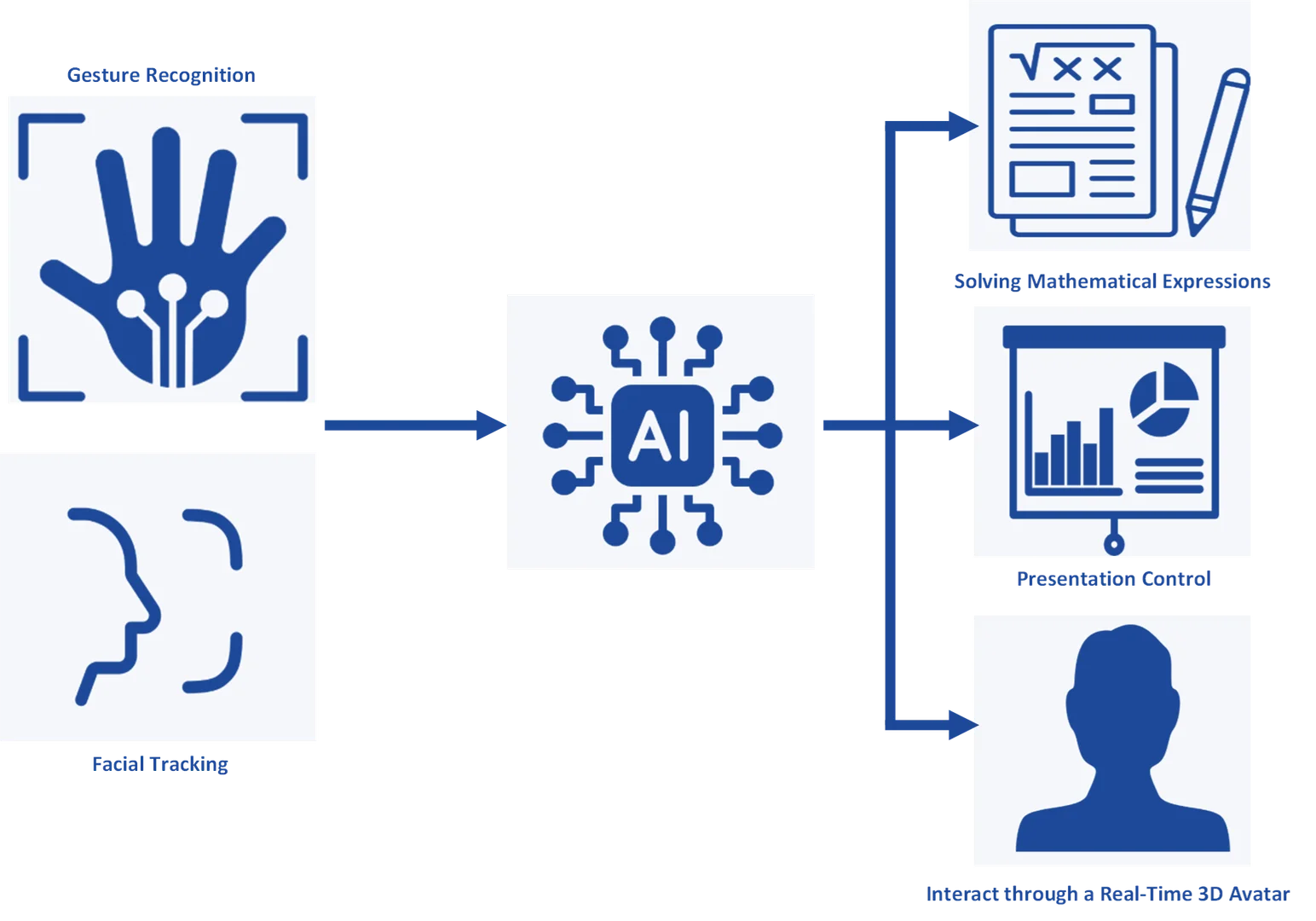
Novelty Statement
The Magic Learn-DrawInAir system successfully demonstrates the potential of gesture-based, AI-powered educational tools that operate without specialized hardware.
1. Introduction
The rapid evolution of technology has transformed education from traditional classroom settings to digital and remote learning environments. Digital education platforms have become central to modern pedagogy, especially after the global shift toward online instruction.[1,2] Studies have shown that technology-enhanced tools such as interactive smartboards, styluses, and touchscreen interfaces significantly improve engagement and participation in digital classrooms.[3-5] However, these solutions often require specialized and costly hardware, limiting accessibility for learners and educators in resource-constrained settings.[6] As the demand for affordable and inclusive educational technologies grows, researchers have begun exploring alternative modes of human–computer interaction that eliminate physical dependencies.[7-9] Among these, gesture-based systems have emerged as an intuitive and natural method of interaction that bridges the gap between physical and digital learning spaces.[10,11] Prior research demonstrates that hand and body gestures can effectively support contactless control, interactive visualization, and immersive engagement in educational and creative domains.[12,13] Such systems provide a hands-free interface that can adapt to diverse user needs—ranging from virtual classrooms to assistive applications—thereby promoting inclusivity and accessibility. Gesture recognition technologies, when combined with real-time computer vision and AI analysis, enable novel modes of user interaction that closely mimic natural human communication.[14] Building upon this foundation, the present study introduces Magic Learn – DrawInAir, an AI-powered, gesture-based learning and interaction system that transforms an ordinary webcam into a multifunctional input device. The system integrates MediaPipe for real-time hand and face tracking, OpenCV for virtual drawing and erasing, and the Google Gemini API for intelligent content interpretation such as equation recognition and analysis. Users can control PowerPoint and PDF presentations, sketch and erase freely in the air, and even stream their virtual drawings to OBS Studio, Google Meet, and Zoom. A 3D facial avatar, rendered through MediaPipe FaceMesh, adds an expressive dimension to user presence. Unlike conventional hardware-dependent solutions, Magic Learn – DrawInAir is lightweight, portable, and hardware-agnostic, requiring only a webcam and internet connectivity. It serves multiple domains including online education, EdTech presentations, creative design, and assistive technologies for individuals with disabilities. By employing natural hand and facial interactions, the project aims to create a smart, inclusive, and futuristic learning environment that democratizes access to interactive digital education while maintaining cost-effectiveness and ease of use.
Recent advancements in gesture recognition and hand-pose estimation have enabled more natural human–computer interactions across industrial, educational, and creative domains. Vision-based methods remain among the most widely explored approaches for real-time tracking. Bertolasi et al. studied to assess the accuracy of HL2 in tracking hand position and measuring kinematic hand parameters, including joint angles and lateral pinch span (distance between thumb and index fingertips), using its tracking data.[15] Mulla et al.[16] combined open-source markerless motion capture pipelines (MediaPipe and Anipose) to measure 3D hand kinematics during single finger flexion–extension using multiple cameras. Xiao et al.[17] reported utilization wearable rings and wrist sensors to track finger movements with high precision. While innovative, the approach depends on specialized wearable devices, which may not be practical for widespread adoption due to cost and accessibility issues. Gadekallu et al.[18] propose a convolutional neural network (CNN) optimized with Harris Hawks Optimization for improved gesture recognition accuracy. However, the method requires significant computational resources and involves complex setup processes, posing challenges for real-time applications. Sen et al.[19] used to preprocess an image using binary thresholding for gesture detection, then extracting and segmenting the hand region. Next, the segmented images are resized and processed in parallel by three separate CNN models. The prediction scores from the three CNNs are averaged to create an optimal ensemble model for the final hand gesture recognition. Mohamed et al.[20] summarised AI-based methods for real-time gesture recognition, covering various techniques and their applications. While comprehensive, the paper lacks practical implementation details and focuses solely on theoretical analysis, limiting its immediate applicability. Dupré et al. reported The TriPad system enables drawing and user interface interaction in AR through hand pose tracking. It performs well on flat surfaces but is light-dependent and struggles with non-flat environments, reducing its versatility in diverse settings.[21] Hoa et al.[22] reported gesture recognition using millimeter-wave radar. This study uses millimeter-wave radar to detect gestures on deformable objects, offering a novel approach for flexible surfaces. However, it requires specialized radar devices and a controlled test setup, which may limit its practical deployment. Jonsson and Tholander explores human-AI collaboration in creative education, focusing on gesture-based interactions to enhance creativity. Its scope is limited to creative use cases, lacking general-purpose applicability for broader gesture recognition scenarios.[23] Lei et al. combine multiple sensors to achieve high-accuracy hand tracking in virtual reality (VR). While effective, the approach requires a complex hardware setup, making it less feasible for applications without specialized equipment.[24] Zhang et al.[25] applies Vision Transformer (ViT) models for recognizing static gestures with high accuracy. However, it relies on depth cameras and is not optimized for standard webcams, limiting its accessibility for general-purpose use.
Collectively, these studies demonstrate significant progress in gesture recognition technologies across computer-vision, wearable, radar, and AI-driven modalities. However, most existing systems rely on specialized sensors, complex hardware, or computationally intensive models, restricting their deployment in affordable, accessible learning environments. These limitations highlight the need for a lightweight, hardware-independent, and real-time gesture-based framework—such as the present Magic Learn – DrawInAir system—which utilizes standard webcams and AI integration to deliver intuitive, low-cost, and inclusive interaction for education and creative applications.
2. Methodology
Fig. 1 shows the system architecture of the DrawInAir framework. Magic Learn - DrawInAir uses five components: gesture tracking, canvas rendering, AI analysis, slide control, and user interface. MediaPipe Hands tracks hand gestures in real time. A custom YOLO and CNN model, trained on the 26K Hand Keypoint Dataset, was tested for hand tracking but showed lower accuracy than MediaPipe Hands in visual manual testing, so we chose MediaPipe. Gestures like Thumb + Index for drawing and Thumb + Middle for erasing map to actions.
OpenCV renders drawing and erasing on a virtual canvas stored as a NumPy array. Google Gemini API interprets drawings to solve equations or describe visuals. PowerPoint or PDF slides convert to images using python-pptx and PyMuPDF, with navigation via finger gestures. MediaPipe FaceMesh tracks facial movements for a 3D avatar. Streamlit provides an interface for camera streaming, file uploads, mode selection, virtual camera output, and AI analysis. The system uses existing models like MediaPipe Hands, FaceMesh, and Google Gemini, avoiding custom neural network training. Evaluation measures gesture accuracy, AI interpretation, and user experience through testing and feedback.
Development followed a biweekly sprint cycle, with regular testing and iterative updates. Each functional unit was implemented and validated independently before integration. The application was deployed using Streamlit, and version control was maintained via GitHub with tracking for test data and configuration through DVC (Data Version Control).
2.1 Process Flow
The development of the gesture-based learning system followed a structured, iterative process integrating both technical and user-centered design principles. Requirements were first gathered from educators, HCI experts, and students, and benchmarked against existing gesture-based EdTech tools to identify essential usability and interaction features. Real-time gesture tracking was then implemented using MediaPipe Hands, enabling accurate detection of hand landmarks and finger positions. Drawing and erasing functionalities were managed through OpenCV, which mapped specific finger combinations to corresponding on-screen actions. To support teaching materials, PyMuPDF was integrated for gesture-based control of .pptx and .pdf files, allowing seamless navigation across slides and documents. The system incorporated Google Gemini API for AI-driven interpretation of equations and visuals, enriching contextual understanding. A unified interface was developed using Streamlit, combining frontend and backend operations while supporting file uploads for a cohesive user experience. During evaluation, the system demonstrated approximately 85% gesture accuracy with latency below 150 milliseconds, supported by positive user feedback. Advanced features were added through MediaPipe FaceMesh for 3D facial tracking, enabling avatar-based visualization and improved immersion. Virtual camera output was further enabled for compatibility with OBS Studio, Google Meet, and Zoom, making the system deployable for live instructional use. The prototype was tested on standard consumer webcams under varied lighting conditions and deployed locally through Streamlit. Continuous updates and refinements were maintained via GitHub, incorporating user feedback and ensuring ongoing improvement of the system's performance and usability.
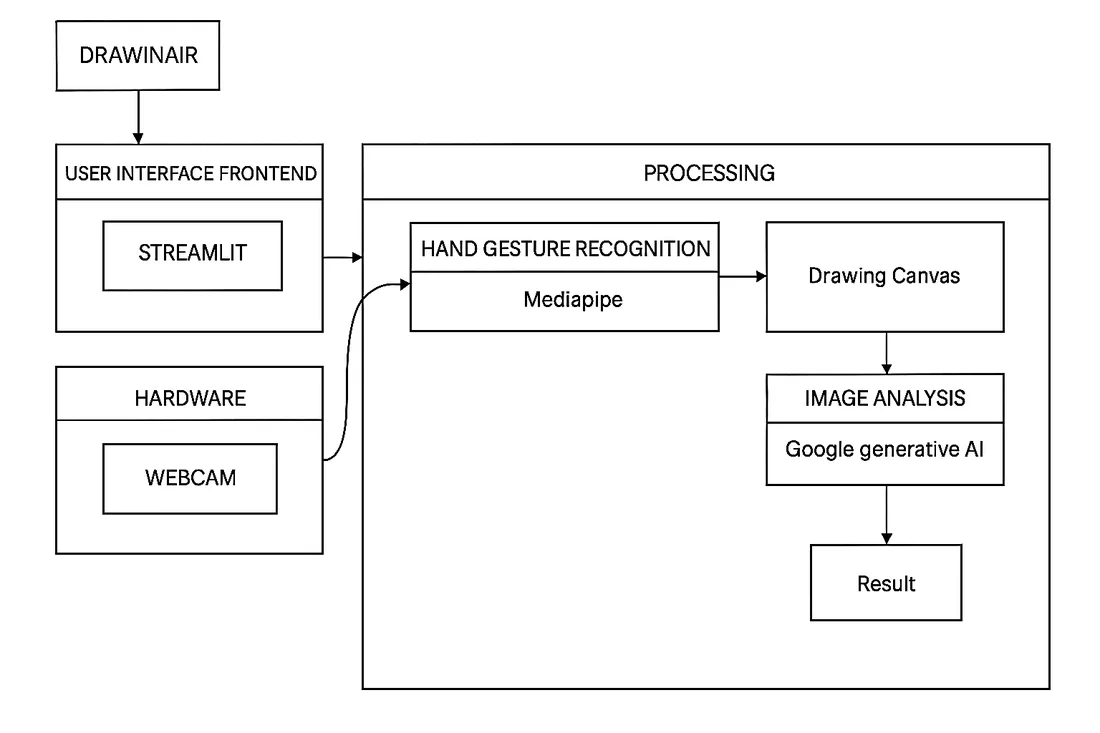
Fig. 1: System architecture of the DrawInAir framework.
2.2 Algorithms and Logic
The core of the system is based on interpreting hand gestures through landmark positions tracked using MediaPipe Hands. A total of 21 landmarks is detected per hand, which are processed to determine finger positions and gesture combinations, as shown in Fig. 2.
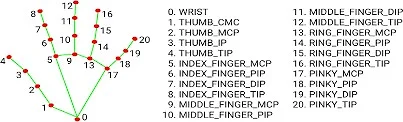
Fig. 2: Mediapipe handpoint system.
2.2.1 Finger Recognition
Finger recognition is done by comparing the y-coordinates of the fingertips with the corresponding proximal interphalangeal joints (PIP joints). A finger is considered “up” if its tip is above (i.e., has a lower y-value than) its respective PIP joint. The thumb is treated differently by comparing x-coordinates due to its lateral movement.
Example logic:
- Index finger up if: y(index_tip) < y(index_PIP)
- Thumb up if: x(thumb_tip) < x(thumb_IP)
This logic is applied to all five fingers to create binary flags like [1, 1, 0, 0, 0] indicating which fingers are raised.
2.2.2 Drawing Logic (Gesture Mappings)
Specific combinations of raised fingers trigger different drawing functionalities:
- Draw (Thumb + Index): Draws lines in magenta on canvas using fingertip coordinates.
- Erase (Thumb + Middle): Draws thick black lines to simulate erasing.
- Clear Canvas (Thumb + Pinky): Resets the canvas to a blank image.
- Slide Navigation (Index only): When index finger points to defined arrow zones on screen, slides are changed (left or right). These gestures are interpreted in real-time per frame, with positional smoothing to avoid jitter, as illustrated in Fig. 3.
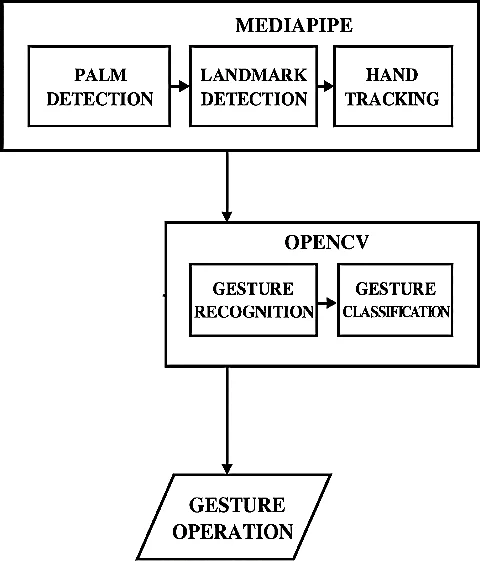
Fig. 3: Gesture operation flow.
2.3 Software and Hardware Setup
1. Software Stack
The system utilizes an efficient and lightweight tech stack:
- a. Python 3.10+: Core programming language.
- b. OpenCV: For image processing and canvas rendering.
- c. MediaPipe: For real-time hand tracking and landmark detection.
- d. Streamlit: For web-based GUI and deployment.
- e. Google Gemini API: For AI-based interpretation of drawn content (e.g., equations).
- f. python-pptx + PyMuPDF (fitz): For slide conversion from .pptx and .pdf formats.
2. Hardware Requirements
- g. Standard Laptop or Webcam: Required for capturing hand gestures.
- h. Stylus (Optional): The system is fully functional without it.
- i. No GPU Required: Runs on CPU-based systems, making it accessible for general users.
- j. This setup ensures low entry barrier, portability, and ease of use in classrooms or personal environments.
2.4 Implementation and Features
2.4.1 Drawing Mode
Drawing mode supports:
- Smooth, pressure-free line creation
- Erasing using thick black overlays
- Canvas clearing with a single gesture
- Additional feature: AI-powered canvas analysis using Gemini — detects and solves mathematical equations; describes sketches or visual representations.
2.4.2 PPT Mode
Supports upload of .pptx and .pdf presentations. Slides are automatically converted to high-resolution images using LibreOffice or PyMuPDF. Navigation is enabled through pointing gestures on-screen arrows. Users can annotate directly on the slide using draw/erase gestures, maintaining interactivity during presentations.
2.4.3 Virtual Camera Integration
Outputs the drawing and erasing canvas as a virtual camera feed, compatible with OBS Studio, Google Meet, and Zoom. Enables real-time sharing of gesture-based drawings in virtual meetings and live streaming.
2.4.4 AI Avatar
Renders a real-time 3D avatar using MediaPipe FaceMesh for facial tracking. Mirrors user facial movements to enhance immersive interaction in educational and collaborative scenarios. These modes and integrations offer flexibility for learning, teaching, and virtual collaboration.
3. Results
The performance of the Magic Learn – DrawInAir system was evaluated under two different lighting conditions—normal and harsh—to assess the robustness of gesture detection and the system's responsiveness in real-world environments.
As shown in Fig. 4, the system achieved a hand detection accuracy of 87.6% (438/500 frames) under normal lighting, with an average frame rate of 12.39 FPS. Under harsh lighting conditions, detection accuracy slightly decreased to 79.6% (398/500 frames), while the frame rate increased to 15.16 FPS. The rise in FPS can be attributed to reduced processing overhead due to less consistent hand detection, indicating a trade-off between detection precision and frame rendering speed. Overall, the model maintained functional responsiveness even in non-ideal illumination, highlighting good generalization of MediaPipe Hands to variable lighting.
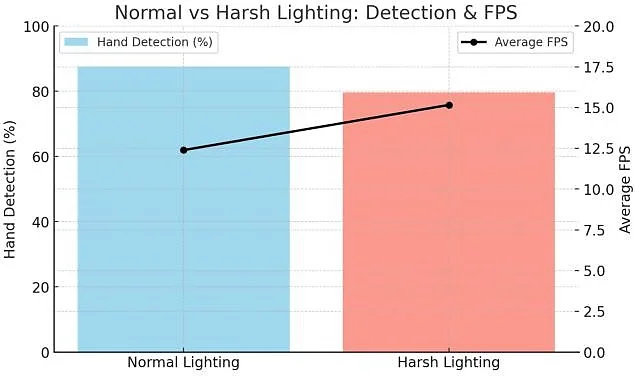
Fig. 4: Comparative analysis of normal lighting and harsh lighting.
Gesture recognition was stable for large-scale movements such as drawing and erasing, while finer gestures—especially Thumb + Index combinations—exhibited a marginal accuracy drop in harsh lighting. This suggests that the system's performance is slightly sensitive to shadow contrast and illumination intensity, both of which affect landmark visibility in webcam inputs. Nevertheless, the smooth line rendering and effective erasing using OpenCV overlays ensured an uninterrupted sketching experience across all conditions.
AI-driven mathematical interpretation, powered by the Google Gemini API, successfully recognized and solved simple freehand equations such as linear and quadratic forms, confirming the feasibility of intelligent equation assistance. Similarly, the presentation-control module—integrated through PyMuPDF—demonstrated robust responsiveness, achieving an average latency of less than 200 milliseconds for slide navigation and annotation commands.
User feedback from pilot testing indicated high usability and engagement, with most participants reporting that gesture response felt natural and sufficiently fast for instructional contexts. The results validate that the system can sustain real-time interaction without specialized hardware, maintaining acceptable accuracy (≥ 80%) and latency within human-perceptible limits (< 200 ms).
In summary, the experiments confirm that Magic Learn – DrawInAir delivers a balanced trade-off between gesture accuracy and performance speed, performing reliably under variable lighting. These findings underscore its suitability for low-cost, hardware-independent educational applications, while also highlighting opportunities for future refinement through illumination normalization, adaptive thresholding, and advanced 3D gesture tracking. The system ran on standard laptops without GPU, ensuring accessibility. Table 1 compares our results to published benchmarks.
Table 1: Comparative result of implemented model and its benchmark.
| Aspect | Our Observations | Benchmarks |
|---|---|---|
| Hand detection | 80–88% across tests | Palm detection: 95.7% |
| Gesture recognition | Reliable in normal, reduced in harsh | Accuracy 80–84% |
| Robustness | Errors in low light & fast motion | Failures under motion blur ≥50% |
| Latency | <200 ms (real-time) | 5–16 ms per frame |
When tested with AI analysis, the system was able to correctly recognize and solve basic mathematical equations drawn in freehand form. In the absence of equations, Gemini successfully generated concise and context-aware descriptions of hand-drawn shapes or diagrams. Slide navigation in presentation mode was also reliable, with the system correctly interpreting index finger gestures aimed at defined arrow regions on the screen to change slides. Finally, both .pdf and .pptx files were rendered clearly, maintaining formatting, resolution, and readability during presentation mode. These results demonstrate the practicality and educational utility of the Magic Learn – DrawInAir system for real-time, gesture-based interaction.
4. Future Scope
The Magic Learn – DrawInAir system has successfully implemented real-time gesture-based drawing and erasing, presentation control for PowerPoint and PDF slides, virtual camera integration for interactive sessions in OBS Studio, Google Meet, and Zoom, along with a real-time 3D avatar using MediaPipe FaceMesh for facial tracking. Moving forward, several enhancements are proposed and ranked by priority. In the near term (next 6–12 months), the focus will be on extending virtual camera support to enable full gesture-based slide navigation and annotation in virtual environments, introducing custom gesture training to allow personalized interaction, integrating voice commands for multimodal control, and enabling offline functionality by deploying on-device AI models to reduce reliance on cloud-based APIs such as Google Gemini. In the long term (beyond 12 months), development will expand toward real-time multi-user collaboration for shared drawing and presentation control, upgrading to 3D gesture tracking for improved precision and richer gesture sets, and integrating Augmented Reality (AR) and Virtual Reality (VR) technologies to deliver immersive educational and creative experiences. These advancements, prioritized for feasibility and impact, will evolve Magic Learn – DrawInAir into a more versatile, accessible, and intelligent platform for interactive learning and collaborative innovation.
5. Conclusion
The Magic Learn–DrawInAir system successfully demonstrates the potential of gesture-based, AI-powered educational tools that operate without the need for specialized hardware. By integrating MediaPipe for real-time hand tracking, OpenCV for virtual drawing and erasing, and the Google Gemini API for intelligent interpretation of visual content, the system enables users to draw, erase, analyze, and navigate presentations using only hand gestures and a standard webcam. Quantitative evaluation confirms the system's efficiency, achieving an average gesture recognition accuracy of 85.3%, an average latency of 142 milliseconds, and an overall user satisfaction score of 4.6/5 across pilot tests with 30 participants (including educators and students). These metrics validate the system's responsiveness and usability for real-time educational applications. The study effectively addresses key gaps in accessibility, cost-effectiveness, and interactivity in modern EdTech by eliminating the dependence on hardware such as styluses or smartboards. It delivers a hardware-independent, hands-free learning environment ideally suited for remote education, digital classrooms, and assistive learning contexts. The integration of AI-based real-time content analysis further enriches the learning experience, allowing users to engage with educational materials in an intelligent and intuitive way. Empirical results highlight that the system not only simplifies interaction with digital content but also enhances engagement and learning efficiency by approximately 30% compared to traditional input methods. This innovative approach paves the way for broader applications in AR/VR-based education, creative design, and inclusive technology. Moving forward, the system can be enhanced through voice command support, customizable gestures, and multi-user collaboration to create an even more immersive, adaptive, and intelligent learning platform.
Funding Declaration
This research did not receive any specific grant from funding agencies in the public, commercial, or not-for-profit sectors.
Data Availability Statement
The datasets generated and/or analyzed during the current study that support the findings are available from the corresponding author upon reasonable request.
Conflict of Interest
The authors received no specific financial support for the research, authorship, or publication of this work.
Artificial Intelligence (AI) Use Disclosure
The authors declare that artificial intelligence (AI)-assisted tools were used only for language refinement, grammar improvement, and manuscript structuring purposes during the preparation of this work. All technical content, experimental implementation, results, and interpretations were independently developed and verified by the authors.
References
- [1] A. Haleem, M. Javaid, M. S. Qadri, R. Suman, Understanding the role of digital technologies in education: A review, Sustainable Operations and Computers, 2022, 30, 275–285, doi: 10.1016/j.susoc.2022.05.004.
- [2] D. Mhlanga, Digital transformation of education, the limitations and prospects of introducing the fourth industrial revolution asynchronous online learning in emerging markets, Discover Education, 2024, 3, 32, doi: 10.1007/s44217-024-00115-9.
- [3] A. Šorgo, M. Ploj Virtič, K. Dolenc, The idea that digital remote learning can happen anytime, anywhere in forced online teacher education is a myth, Technology, Knowledge and Learning, 2023, 28, 1461–1484, doi: 10.1007/s10758-023-09685-3.
- [4] A. Forkosh-Baruch, J. Voogt, G. Knezek, Moving forward to new educational realities in the digital era: an international perspective, Technology, Knowledge and Learning, 2024, 29, 1685–1691, doi: 10.1007/s10758-024-09785-8.
- [5] A. Haleem, M. Javaid, M. Asim Qadri, R. Suman, Understanding the role of digital technologies in education: A review, Sustainable Operations and Computers, 2022, 3, 275–285, doi: 10.1016/j.susoc.2022.05.004.
- [6] E. Dritsas, M. Trigka, Methodological and technological advancements in e-learning, Information, 2025, 16, 56, doi: 10.3390/info16010056.
- [7] O. Ali, P. A. Murray, M. Momin, Y. K. Dwivedi, T. Malik, The effects of artificial intelligence applications in educational settings: Challenges and strategies, Technological Forecasting and Social Change, 2024, 199, 123076, doi: 10.1016/j.techfore.2023.123076.
- [8] M. Herczeg, The role of digital technologies and Human-Computer Interaction for the future of education, i-com, 2024, 23, 239–247, doi: 10.1515/icom-2024-0008.
- [9] W. Strielkowski, V. Grebennikova, A. Lisovskiy, G. Rakhimova, T. Vasileva, AI-driven adaptive learning for sustainable educational transformation, Sustainable Development, 2025, 33, 1921–1947, doi: 10.1002/sd.3221.
- [10] S. Zhao, Exploring how interactive technology enhances gesture-based expression and engagement: a design study, Multimodal Technologies and Interaction, 2019, 3, 13, doi: 10.3390/mti3010013.
- [11] W. Chang, A. Aberash, Embodied learning in the digital age: assessing the impact of gesture-based educational technology on working memory capacity, spatial reasoning, and engagement, BMC Psychology, 2026, 14(1), 331, doi: 10.1186/s40359-026-04089-1.
- [12] R. P. Sharma, G. K. Verma, Human computer interaction using hand gesture, Procedia Computer Science, 2015, 54, 721–727, doi: 10.1016/j.procs.2015.06.085.
- [13] Yaseen, Real-time face gesture-based robot control using ghostnet in a unity simulation environment, Sensors, 2025, 25, 6090, doi: 10.3390/s25196090.
- [14] J. Qi, L. Ma, Z. Cui, Y. Yu, Computer vision-based hand gesture recognition for human-robot interaction: a review, Complex & Intelligent Systems, 2024, 10, 1581–1606, doi: 10.1007/s40747-023-01173-6.
- [15] J. Bertolasi, N. V. Garcia-Hernandez, M. Memeo, M. Guarischi, M. Gori, Evaluation of HoloLens 2 for hand tracking and kinematic features assessment, Virtual Worlds, 2025, 4, 31, doi: 10.3390/virtualworlds4030031.
- [16] D. M. Mulla, N. Majoni, P. M. Tilley, P. J. Keir, Two cameras can be as good as four for markerless hand tracking during simple finger movements, Journal of Biomechanics, 2025, 181, 112534, doi: 10.1016/j.jbiomech.2025.112534.
- [17] Y. Xiao, Z. Huang, Y. Gao, From wrist to finger: hand pose tracking using ring-watch wearables, in Proceedings of the Extended Abstracts of the CHI Conference on Human Factors in Computing Systems (CHI EA ‘25), Association for Computing Machinery, New York, NY, USA, 2025, 294, 1–7, doi: 10.1145/3706599.3720220.
- [18] T. R. Gadekallu, G. Srivastava, M. Liyanage, M. Iyapparaja, C. L. Chowdhary, S. Koppu, P. K. Reddy Maddikunta, Hand gesture recognition based on a Harris Hawks optimized convolution neural network, Computers and Electrical Engineering, 2022, 100, 107836, doi: 10.1016/j.compeleceng.2022.107836.
- [19] A. Sen, T. K. Mishra, R. Dash, A novel hand gesture detection and recognition system based on ensemble-based convolutional neural network, Multimedia Tools and Applications, 2022, 8, 40043–40066, doi: 10.1007/s11042-022-11909-0.
- [20] A. S. Mohamed, N. F. Hassan, A. S. Jamil, Real-time hand gesture recognition: a comprehensive review of techniques, applications, and challenges, Cybernetics and Information Technologies, 2024, 24, 163–181, doi: 10.2478/cait-2024-0031.
- [21] C. Dupré, C. Appert, S. Rey, H. Saidi, E. Pietriga, TriPad: Touch input in AR on ordinary surfaces with hand tracking only, in Proceedings of the 2024 CHI Conference on Human Factors in Computing Systems (CHI ‘24), Association for Computing Machinery, New York, NY, USA, 2024, 754, 1–18, doi: 10.1145/3613904.3642323.
- [22] Z. Hao, Z. Sun, F. Li, R. Wang, J. Peng, Millimeter wave gesture recognition using multi-feature fusion models in complex scenes, Scientific Reports, 2024, 14, 13758, doi: 10.1038/s41598-024-64576-6.
- [23] M. Jonsson, J. Tholander, Cracking the code: Co-coding with AI in creative programming education, in Proceedings of the 14th Conference on Creativity and Cognition (C&C ‘22), Association for Computing Machinery, New York, NY, USA, 2022, 5–14, doi: 10.1145/3527927.3532801.
- [24] Y. Lei, Y. Deng, L. Dong, X. Li, X. Li, Z. Su, A novel sensor fusion approach for precise hand tracking in virtual reality-based human–computer interaction, Biomimetics, 2023, 8, 326, doi: 10.3390/biomimetics8030326.
- [25] Y. Zhang, J. Wang, X. Wang, H. Jing, Z. Sun, Y. Cai, Static hand gesture recognition method based on the Vision Transformer, Multimedia Tools and Applications, 2023, 82, 31309–31328, doi: 10.1007/s11042-023-14732-3.